> ## Documentation Index
> Fetch the complete documentation index at: https://docs-dev-feat-update-styling-docs-for-universal-components.mintlify.site/llms.txt
> Use this file to discover all available pages before exploring further.

# カスタムメッセージと翻訳

> Formsを使ってカスタムメッセージと翻訳の作成方法を説明します。

フォームメッセージをカスタマイズし、ユーザーに独自のフォームエクスペリエンスを提供できます。さらに、ローカライズエクスペリエンスのために、フォームコンポーネント、エラー、その他カスタムメッセージをその他言語に翻訳できます。

## メッセージ

フォームエディターにより、ユーザーに対してエラーメッセージをカスタマイズし、その他カスタムメッセージを作成できます。

### エラーメッセージ

フォームのデフォルトのエラーメッセージを置き換えるカスタムエラーメッセージを作成できます。

カスタムエラーメッセージを作成するには、次の手順に従います。

1. Auth0 Dashboardで、 **［Actions（アクション）］>［Forms（フォーム）］** に移動します。
2. フォームエディターの左メニューにある **［Messages（メッセージ）］** を選択します。
3. **［Error（エラー）］** タブを選択します **。**
4. 該当するフィールドにカスタムエラーメッセージを入力し、デフォルトメッセージと置き換えます。
5. **［Publish（公開）］** を選択し、保存します。

### カスタムメッセージ

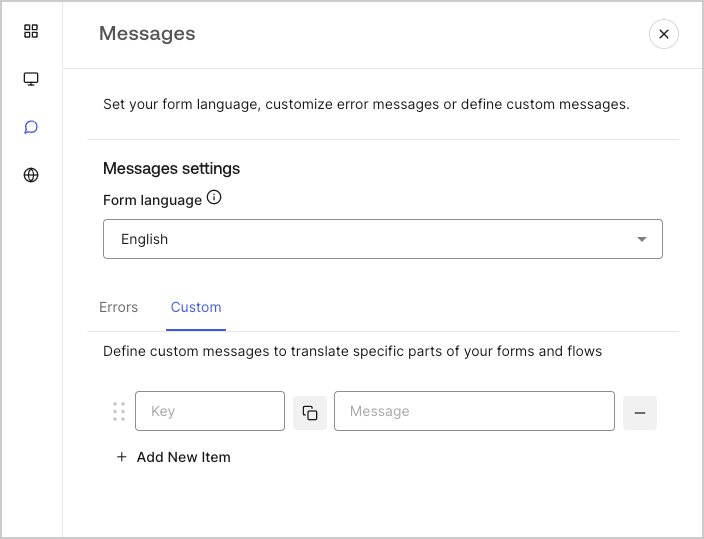
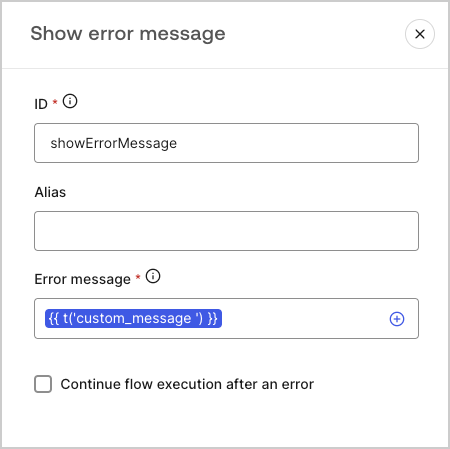
デフォルトのメッセージにカスタムメッセージを追加して、フォームのエクスペリエンスをさらにパーソナライズすることができます。たとえば、フロー内でアクションがエラーを返したときにユーザーに表示されるカスタムメッセージを追加できます。

#### カスタムメッセージを作成する

カスタムメッセージを作成するには、次の手順に従います。

1. フォームエディターの左側のメニューから **［Messages（メッセージ）］** を選択します。
2. **［Custom（カスタム）］** タブを選択し、 **［Add New Item（新しい項目を追加）］** を選択します。
3. 左側に、メッセージの一意のキーを追加します **。** さらに、次に、右側のフィールドにカスタムメッセージを **入力** します。
4. **［Publish（公開）］** を選択し、保存します。

<Frame>
  <img src="https://mintcdn.com/docs-dev-feat-update-styling-docs-for-universal-components/oquzZmRinmaBtdQK/docs/images/ja-jp/cdy7uua7fh8z/1upBOwWqntPPQF8fqGeN6T/a65674d05c823c5fbe703265558693e4/custom-message.png?fit=max&auto=format&n=oquzZmRinmaBtdQK&q=85&s=a9e2e7cd379aa5d93137658b9733a329" alt="Dashboard > Forms > Custom messages and translations > Custom message" data-og-width="704" width="704" data-og-height="539" height="539" data-path="docs/images/ja-jp/cdy7uua7fh8z/1upBOwWqntPPQF8fqGeN6T/a65674d05c823c5fbe703265558693e4/custom-message.png" data-optimize="true" data-opv="3" srcset="https://mintcdn.com/docs-dev-feat-update-styling-docs-for-universal-components/oquzZmRinmaBtdQK/docs/images/ja-jp/cdy7uua7fh8z/1upBOwWqntPPQF8fqGeN6T/a65674d05c823c5fbe703265558693e4/custom-message.png?w=280&fit=max&auto=format&n=oquzZmRinmaBtdQK&q=85&s=5518761b2e38f7d9ca8f2a3314a111ff 280w, https://mintcdn.com/docs-dev-feat-update-styling-docs-for-universal-components/oquzZmRinmaBtdQK/docs/images/ja-jp/cdy7uua7fh8z/1upBOwWqntPPQF8fqGeN6T/a65674d05c823c5fbe703265558693e4/custom-message.png?w=560&fit=max&auto=format&n=oquzZmRinmaBtdQK&q=85&s=f02beae0d0b1a051aecff9ffef05ad7f 560w, https://mintcdn.com/docs-dev-feat-update-styling-docs-for-universal-components/oquzZmRinmaBtdQK/docs/images/ja-jp/cdy7uua7fh8z/1upBOwWqntPPQF8fqGeN6T/a65674d05c823c5fbe703265558693e4/custom-message.png?w=840&fit=max&auto=format&n=oquzZmRinmaBtdQK&q=85&s=dd2dfeaecba923d838142438d139765a 840w, https://mintcdn.com/docs-dev-feat-update-styling-docs-for-universal-components/oquzZmRinmaBtdQK/docs/images/ja-jp/cdy7uua7fh8z/1upBOwWqntPPQF8fqGeN6T/a65674d05c823c5fbe703265558693e4/custom-message.png?w=1100&fit=max&auto=format&n=oquzZmRinmaBtdQK&q=85&s=d16c6811aefc1fa6c597eedcaef5ad3c 1100w, https://mintcdn.com/docs-dev-feat-update-styling-docs-for-universal-components/oquzZmRinmaBtdQK/docs/images/ja-jp/cdy7uua7fh8z/1upBOwWqntPPQF8fqGeN6T/a65674d05c823c5fbe703265558693e4/custom-message.png?w=1650&fit=max&auto=format&n=oquzZmRinmaBtdQK&q=85&s=2f31afa0de336da82966fc73d132c628 1650w, https://mintcdn.com/docs-dev-feat-update-styling-docs-for-universal-components/oquzZmRinmaBtdQK/docs/images/ja-jp/cdy7uua7fh8z/1upBOwWqntPPQF8fqGeN6T/a65674d05c823c5fbe703265558693e4/custom-message.png?w=2500&fit=max&auto=format&n=oquzZmRinmaBtdQK&q=85&s=4a48c08ceaddfa1322cd3974e7806c74 2500w" />
</Frame>

#### カスタムメッセージをフォームに追加する

フォームでカスタムメッセージを参照するには、カスタムメッセージの一意のキーを指定した関数`{{t('custom_unique_key')}}`を使用します。
<Frame>
  <img src="https://mintcdn.com/docs-dev-feat-update-styling-docs-for-universal-components/XfY3iq83R_tsdkMC/docs/images/ja-jp/cdy7uua7fh8z/45p4V7w5gw7DQZyJ08ECSH/d040720d9aa19f6e97e21defcd428e55/translation-function.png?fit=max&auto=format&n=XfY3iq83R_tsdkMC&q=85&s=8289b12a0443d7930c507c0f67faa00f" alt="Dashboard > Forms > Custom messages and translations > Translation function" data-og-width="450" width="450" data-og-height="449" height="449" data-path="docs/images/ja-jp/cdy7uua7fh8z/45p4V7w5gw7DQZyJ08ECSH/d040720d9aa19f6e97e21defcd428e55/translation-function.png" data-optimize="true" data-opv="3" srcset="https://mintcdn.com/docs-dev-feat-update-styling-docs-for-universal-components/XfY3iq83R_tsdkMC/docs/images/ja-jp/cdy7uua7fh8z/45p4V7w5gw7DQZyJ08ECSH/d040720d9aa19f6e97e21defcd428e55/translation-function.png?w=280&fit=max&auto=format&n=XfY3iq83R_tsdkMC&q=85&s=0722e744e729d99d208cf277ee0569d0 280w, https://mintcdn.com/docs-dev-feat-update-styling-docs-for-universal-components/XfY3iq83R_tsdkMC/docs/images/ja-jp/cdy7uua7fh8z/45p4V7w5gw7DQZyJ08ECSH/d040720d9aa19f6e97e21defcd428e55/translation-function.png?w=560&fit=max&auto=format&n=XfY3iq83R_tsdkMC&q=85&s=737386bf339a5a98a226e7bf2d8404a5 560w, https://mintcdn.com/docs-dev-feat-update-styling-docs-for-universal-components/XfY3iq83R_tsdkMC/docs/images/ja-jp/cdy7uua7fh8z/45p4V7w5gw7DQZyJ08ECSH/d040720d9aa19f6e97e21defcd428e55/translation-function.png?w=840&fit=max&auto=format&n=XfY3iq83R_tsdkMC&q=85&s=31cb01307dec03f17493c5ea61a779b4 840w, https://mintcdn.com/docs-dev-feat-update-styling-docs-for-universal-components/XfY3iq83R_tsdkMC/docs/images/ja-jp/cdy7uua7fh8z/45p4V7w5gw7DQZyJ08ECSH/d040720d9aa19f6e97e21defcd428e55/translation-function.png?w=1100&fit=max&auto=format&n=XfY3iq83R_tsdkMC&q=85&s=333ba34c02d3ca24c85d83a4204cae5a 1100w, https://mintcdn.com/docs-dev-feat-update-styling-docs-for-universal-components/XfY3iq83R_tsdkMC/docs/images/ja-jp/cdy7uua7fh8z/45p4V7w5gw7DQZyJ08ECSH/d040720d9aa19f6e97e21defcd428e55/translation-function.png?w=1650&fit=max&auto=format&n=XfY3iq83R_tsdkMC&q=85&s=d552f313a47db310329c0bffae050d94 1650w, https://mintcdn.com/docs-dev-feat-update-styling-docs-for-universal-components/XfY3iq83R_tsdkMC/docs/images/ja-jp/cdy7uua7fh8z/45p4V7w5gw7DQZyJ08ECSH/d040720d9aa19f6e97e21defcd428e55/translation-function.png?w=2500&fit=max&auto=format&n=XfY3iq83R_tsdkMC&q=85&s=9c5704022d0e48fd7e9c193c324e6028 2500w" />
</Frame>

## 翻訳

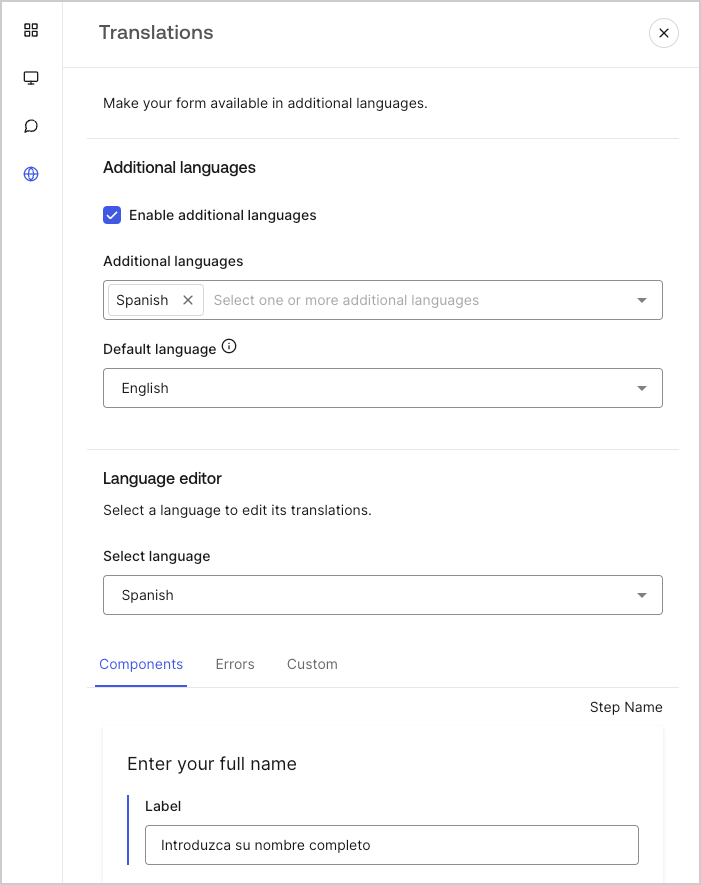
翻訳機能を使用すると、フォームの国際的なユーザーエクスペリエンスを実現できます。この機能は、ユーザーのブラウザ言語を利用して、フォームに適切な言語を決定します。デフォルトでは、一部の標準エラーメッセージの翻訳はスペイン語で提供されます。ただし、質の高いユーザーエクスペリエンスを促進するために、フォームコンポーネント、エラー、カスタムメッセージの翻訳を任意の言語で定義できます。

翻訳を有効にするには、次の手順に従います。

1. Auth0 Dashboardで、 **［Actions（アクション）］>［Forms（フォーム）］** に移動します。
2. フォームエディターの左メニューにある **［Translations（翻訳）］** を選択します。
3. **［Enable additional languages（追加言語を有効にする）］** にチェックを入れます。
4. **［Additional languages（追加言語）］** ドロップダウンメニューから希望する言語を選択します。

### メッセージの翻訳

言語エディターを使用すると、フォームコンポーネント、エラー、その他のカスタムメッセージの翻訳を定義できます。

翻訳を定義するには、次の手順に従います。

1. ［Select language（言語選択）］ドロップダウンメニューから希望する言語を選択します。
2. 次のタブの1つを選択し、翻訳の定義を開始します。

   1. **コンポーネント**
   2. **エラー**
   3. **カスタム**
3. 利用可能なフィールドごとに、必要に応じて翻訳を提供します。
4. **［Publish（公開）］** を選択し、保存します。

<Frame>
  <img src="https://mintcdn.com/docs-dev-feat-update-styling-docs-for-universal-components/1QNTQk8Nobt3KV7D/docs/images/ja-jp/cdy7uua7fh8z/5HY9FA6HZct2XNv5K4pCHY/c5977a7825e15285c3d77c2ca1e299a8/translation-message.png?fit=max&auto=format&n=1QNTQk8Nobt3KV7D&q=85&s=797c3618407168b26430a1c6bbe54ec9" alt="Dashboard > Forms > Custom messages and translations > Translation message" data-og-width="701" width="701" data-og-height="885" height="885" data-path="docs/images/ja-jp/cdy7uua7fh8z/5HY9FA6HZct2XNv5K4pCHY/c5977a7825e15285c3d77c2ca1e299a8/translation-message.png" data-optimize="true" data-opv="3" srcset="https://mintcdn.com/docs-dev-feat-update-styling-docs-for-universal-components/1QNTQk8Nobt3KV7D/docs/images/ja-jp/cdy7uua7fh8z/5HY9FA6HZct2XNv5K4pCHY/c5977a7825e15285c3d77c2ca1e299a8/translation-message.png?w=280&fit=max&auto=format&n=1QNTQk8Nobt3KV7D&q=85&s=1ccd384da68df09237aa18bcc840194d 280w, https://mintcdn.com/docs-dev-feat-update-styling-docs-for-universal-components/1QNTQk8Nobt3KV7D/docs/images/ja-jp/cdy7uua7fh8z/5HY9FA6HZct2XNv5K4pCHY/c5977a7825e15285c3d77c2ca1e299a8/translation-message.png?w=560&fit=max&auto=format&n=1QNTQk8Nobt3KV7D&q=85&s=f515bb274cf7c284015fdb8371076833 560w, https://mintcdn.com/docs-dev-feat-update-styling-docs-for-universal-components/1QNTQk8Nobt3KV7D/docs/images/ja-jp/cdy7uua7fh8z/5HY9FA6HZct2XNv5K4pCHY/c5977a7825e15285c3d77c2ca1e299a8/translation-message.png?w=840&fit=max&auto=format&n=1QNTQk8Nobt3KV7D&q=85&s=212275890a5f8ce7ccfe2b71f1148b04 840w, https://mintcdn.com/docs-dev-feat-update-styling-docs-for-universal-components/1QNTQk8Nobt3KV7D/docs/images/ja-jp/cdy7uua7fh8z/5HY9FA6HZct2XNv5K4pCHY/c5977a7825e15285c3d77c2ca1e299a8/translation-message.png?w=1100&fit=max&auto=format&n=1QNTQk8Nobt3KV7D&q=85&s=663cbd8a61793a4acfbda6358cbcf159 1100w, https://mintcdn.com/docs-dev-feat-update-styling-docs-for-universal-components/1QNTQk8Nobt3KV7D/docs/images/ja-jp/cdy7uua7fh8z/5HY9FA6HZct2XNv5K4pCHY/c5977a7825e15285c3d77c2ca1e299a8/translation-message.png?w=1650&fit=max&auto=format&n=1QNTQk8Nobt3KV7D&q=85&s=54544726092c9603b389e1057c8c4e9c 1650w, https://mintcdn.com/docs-dev-feat-update-styling-docs-for-universal-components/1QNTQk8Nobt3KV7D/docs/images/ja-jp/cdy7uua7fh8z/5HY9FA6HZct2XNv5K4pCHY/c5977a7825e15285c3d77c2ca1e299a8/translation-message.png?w=2500&fit=max&auto=format&n=1QNTQk8Nobt3KV7D&q=85&s=5e31b5628b991128cf6623a592a9fcce 2500w" />
</Frame>