> ## Documentation Index
> Fetch the complete documentation index at: https://docs-dev-feat-update-styling-docs-for-universal-components.mintlify.site/llms.txt
> Use this file to discover all available pages before exploring further.

> Configure an update policy form using Forms for Actions

# Use Cases: Configure an update policy form using Forms

<Card title="Before you start">
  1. Create a [Machine-to-Machine Application](/docs/get-started/auth0-overview/create-applications/machine-to-machine-apps) with the following scopes enabled:

  * `read:users`
  * `update:users`
  * `create:users`
  * `read:users_app_metadata`
  * `update:users_app_metadata`
  * `create:users_app_metadata`

  2. Add a [Vault connection](/docs/customize/forms/vault) using the M2M application credentials.
</Card>

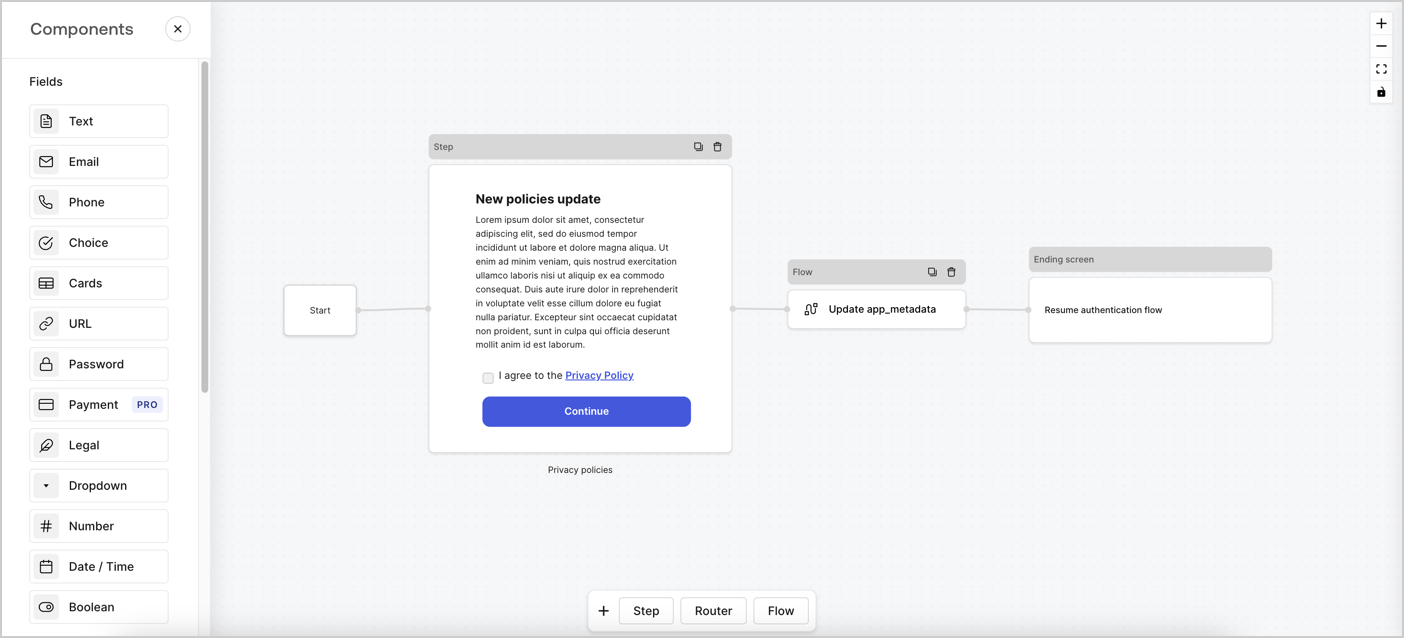
Forms for Actions allows you to create custom privacy policies flows and store the consent under the `app_metadata` object.
<Frame>
  <img src="https://mintcdn.com/docs-dev-feat-update-styling-docs-for-universal-components/aryv-85zS-Myv9K1/docs/images/cdy7uua7fh8z/6i68dMvHDTijfRmSgN1x8Q/ad900e7d4c0fb34645921435472b8684/privavy-policy-form.png?fit=max&auto=format&n=aryv-85zS-Myv9K1&q=85&s=e105c487569ad83fdea633e08bdb6227" alt="Dashboard > Actions > Forms > Privacy policy use case" data-og-width="1404" width="1404" data-og-height="638" height="638" data-path="docs/images/cdy7uua7fh8z/6i68dMvHDTijfRmSgN1x8Q/ad900e7d4c0fb34645921435472b8684/privavy-policy-form.png" data-optimize="true" data-opv="3" srcset="https://mintcdn.com/docs-dev-feat-update-styling-docs-for-universal-components/aryv-85zS-Myv9K1/docs/images/cdy7uua7fh8z/6i68dMvHDTijfRmSgN1x8Q/ad900e7d4c0fb34645921435472b8684/privavy-policy-form.png?w=280&fit=max&auto=format&n=aryv-85zS-Myv9K1&q=85&s=402c562410cf432e321583d6eb691bb4 280w, https://mintcdn.com/docs-dev-feat-update-styling-docs-for-universal-components/aryv-85zS-Myv9K1/docs/images/cdy7uua7fh8z/6i68dMvHDTijfRmSgN1x8Q/ad900e7d4c0fb34645921435472b8684/privavy-policy-form.png?w=560&fit=max&auto=format&n=aryv-85zS-Myv9K1&q=85&s=c966e45c4256342c674088ea6b7b40bc 560w, https://mintcdn.com/docs-dev-feat-update-styling-docs-for-universal-components/aryv-85zS-Myv9K1/docs/images/cdy7uua7fh8z/6i68dMvHDTijfRmSgN1x8Q/ad900e7d4c0fb34645921435472b8684/privavy-policy-form.png?w=840&fit=max&auto=format&n=aryv-85zS-Myv9K1&q=85&s=f3a10cc22539be90f007cd1c2e270c99 840w, https://mintcdn.com/docs-dev-feat-update-styling-docs-for-universal-components/aryv-85zS-Myv9K1/docs/images/cdy7uua7fh8z/6i68dMvHDTijfRmSgN1x8Q/ad900e7d4c0fb34645921435472b8684/privavy-policy-form.png?w=1100&fit=max&auto=format&n=aryv-85zS-Myv9K1&q=85&s=bb664591be067712b3fc730363903c8a 1100w, https://mintcdn.com/docs-dev-feat-update-styling-docs-for-universal-components/aryv-85zS-Myv9K1/docs/images/cdy7uua7fh8z/6i68dMvHDTijfRmSgN1x8Q/ad900e7d4c0fb34645921435472b8684/privavy-policy-form.png?w=1650&fit=max&auto=format&n=aryv-85zS-Myv9K1&q=85&s=b8b375c692a281553f8634179efd3f3e 1650w, https://mintcdn.com/docs-dev-feat-update-styling-docs-for-universal-components/aryv-85zS-Myv9K1/docs/images/cdy7uua7fh8z/6i68dMvHDTijfRmSgN1x8Q/ad900e7d4c0fb34645921435472b8684/privavy-policy-form.png?w=2500&fit=max&auto=format&n=aryv-85zS-Myv9K1&q=85&s=46aac27f73fe06f8012bdc717509634b 2500w" />
</Frame>

The sections below outline how you can create an Update Policy form using nodes and flows, along with steps for adding your form to a [Post Login](/docs/customize/actions/explore-triggers/signup-and-login-triggers/login-trigger) Action.

## Create a form from scratch

Follow these steps to create a form to gather information:

1. Open the Form editor by selecting **Auth0 Dashboard > Actions > Forms.**
2. Select **Create Form** > **Start from scratch**.

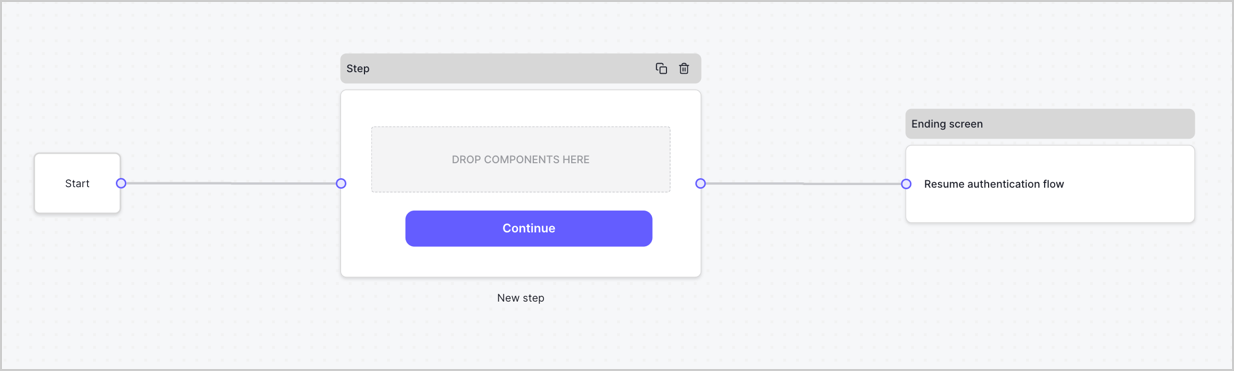
By default, a new form contains a Start node, a Step node, and an Ending screen node.
<Frame>
  <img src="https://mintcdn.com/docs-dev-feat-update-styling-docs-for-universal-components/NIH7s0RqLV85rVO2/docs/images/cdy7uua7fh8z/2TZ9jSjgEcARFpULI6hz4R/a4319a1bd482f2ee5cc23100fdb2f42c/New-form-Forms-for-action-use-case.png?fit=max&auto=format&n=NIH7s0RqLV85rVO2&q=85&s=0081335a1a386163a3afd0aaae72fd1b" alt="Dashboard > Forms > Use Cases > Form" data-og-width="1234" width="1234" data-og-height="371" height="371" data-path="docs/images/cdy7uua7fh8z/2TZ9jSjgEcARFpULI6hz4R/a4319a1bd482f2ee5cc23100fdb2f42c/New-form-Forms-for-action-use-case.png" data-optimize="true" data-opv="3" srcset="https://mintcdn.com/docs-dev-feat-update-styling-docs-for-universal-components/NIH7s0RqLV85rVO2/docs/images/cdy7uua7fh8z/2TZ9jSjgEcARFpULI6hz4R/a4319a1bd482f2ee5cc23100fdb2f42c/New-form-Forms-for-action-use-case.png?w=280&fit=max&auto=format&n=NIH7s0RqLV85rVO2&q=85&s=7c0f7838041b730b0332b28311985d7d 280w, https://mintcdn.com/docs-dev-feat-update-styling-docs-for-universal-components/NIH7s0RqLV85rVO2/docs/images/cdy7uua7fh8z/2TZ9jSjgEcARFpULI6hz4R/a4319a1bd482f2ee5cc23100fdb2f42c/New-form-Forms-for-action-use-case.png?w=560&fit=max&auto=format&n=NIH7s0RqLV85rVO2&q=85&s=b91084454affaeff1ee366291e460eca 560w, https://mintcdn.com/docs-dev-feat-update-styling-docs-for-universal-components/NIH7s0RqLV85rVO2/docs/images/cdy7uua7fh8z/2TZ9jSjgEcARFpULI6hz4R/a4319a1bd482f2ee5cc23100fdb2f42c/New-form-Forms-for-action-use-case.png?w=840&fit=max&auto=format&n=NIH7s0RqLV85rVO2&q=85&s=e4cc85ac84925ec33f6d4fd8db9a3d6f 840w, https://mintcdn.com/docs-dev-feat-update-styling-docs-for-universal-components/NIH7s0RqLV85rVO2/docs/images/cdy7uua7fh8z/2TZ9jSjgEcARFpULI6hz4R/a4319a1bd482f2ee5cc23100fdb2f42c/New-form-Forms-for-action-use-case.png?w=1100&fit=max&auto=format&n=NIH7s0RqLV85rVO2&q=85&s=2776307a44e24788c10588a862059a11 1100w, https://mintcdn.com/docs-dev-feat-update-styling-docs-for-universal-components/NIH7s0RqLV85rVO2/docs/images/cdy7uua7fh8z/2TZ9jSjgEcARFpULI6hz4R/a4319a1bd482f2ee5cc23100fdb2f42c/New-form-Forms-for-action-use-case.png?w=1650&fit=max&auto=format&n=NIH7s0RqLV85rVO2&q=85&s=91c27244070be6c9addf01f56d9f7ef7 1650w, https://mintcdn.com/docs-dev-feat-update-styling-docs-for-universal-components/NIH7s0RqLV85rVO2/docs/images/cdy7uua7fh8z/2TZ9jSjgEcARFpULI6hz4R/a4319a1bd482f2ee5cc23100fdb2f42c/New-form-Forms-for-action-use-case.png?w=2500&fit=max&auto=format&n=NIH7s0RqLV85rVO2&q=85&s=48a1361138cd3c05e00c76e004b70adf 2500w" />
</Frame>

### Configure the Step node

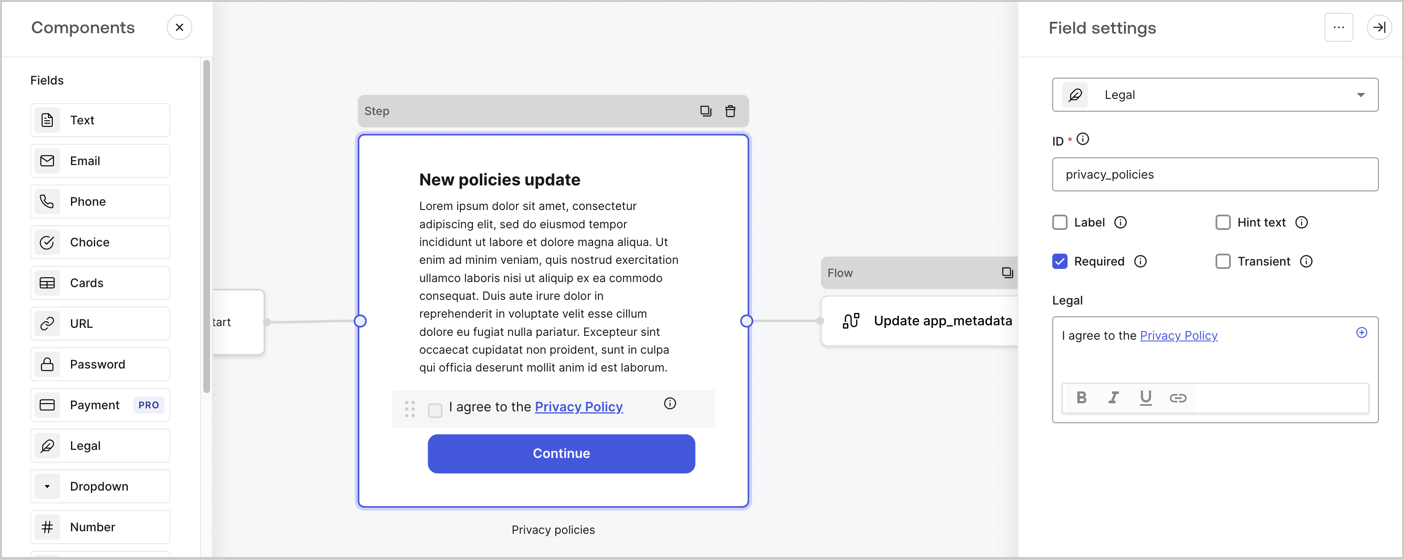
The Step node is the graphical interface visible to users. Add [Fields](/docs/customize/forms/nodes-and-components) to the Step node to collect the new agreement acceptance value by following these steps:

1. Drag a **Rich text** field from the **Components menu** into the **Step** node.

   * **Rich text**: Enter a description of your privacy policies updates.
   * Select **Save**.
2. Drag a **Legal** field into the **Step** node.

   * **ID**: Enter `privacy_policies`.
   * **Required**: Enable the checkbox.
   * **Legal**: Enter `I agree to the Privacy Policy`.
   * Select **Save**.
3. Select **Publish** to save.
<Frame>
  <img src="https://mintcdn.com/docs-dev-feat-update-styling-docs-for-universal-components/u4mR4nqMTYhARK7E/docs/images/cdy7uua7fh8z/59zFFjQjAnjogkc2QGIqqJ/0ad66b1b636544122aa4e65968b76c2c/privacy-policy-step-node.png?fit=max&auto=format&n=u4mR4nqMTYhARK7E&q=85&s=879f92abb5be42f36d1fea7b87c4da81" alt="Dashboard > Actions > Forms > Use case privacy policy step node" data-og-width="1404" width="1404" data-og-height="559" height="559" data-path="docs/images/cdy7uua7fh8z/59zFFjQjAnjogkc2QGIqqJ/0ad66b1b636544122aa4e65968b76c2c/privacy-policy-step-node.png" data-optimize="true" data-opv="3" srcset="https://mintcdn.com/docs-dev-feat-update-styling-docs-for-universal-components/u4mR4nqMTYhARK7E/docs/images/cdy7uua7fh8z/59zFFjQjAnjogkc2QGIqqJ/0ad66b1b636544122aa4e65968b76c2c/privacy-policy-step-node.png?w=280&fit=max&auto=format&n=u4mR4nqMTYhARK7E&q=85&s=0ebd89b5de63a8460fdd970ebc7aca04 280w, https://mintcdn.com/docs-dev-feat-update-styling-docs-for-universal-components/u4mR4nqMTYhARK7E/docs/images/cdy7uua7fh8z/59zFFjQjAnjogkc2QGIqqJ/0ad66b1b636544122aa4e65968b76c2c/privacy-policy-step-node.png?w=560&fit=max&auto=format&n=u4mR4nqMTYhARK7E&q=85&s=cb0a173747d3128ad6b54c7d413a242c 560w, https://mintcdn.com/docs-dev-feat-update-styling-docs-for-universal-components/u4mR4nqMTYhARK7E/docs/images/cdy7uua7fh8z/59zFFjQjAnjogkc2QGIqqJ/0ad66b1b636544122aa4e65968b76c2c/privacy-policy-step-node.png?w=840&fit=max&auto=format&n=u4mR4nqMTYhARK7E&q=85&s=4b73879e6bcff911f31b7a7b65b6b22c 840w, https://mintcdn.com/docs-dev-feat-update-styling-docs-for-universal-components/u4mR4nqMTYhARK7E/docs/images/cdy7uua7fh8z/59zFFjQjAnjogkc2QGIqqJ/0ad66b1b636544122aa4e65968b76c2c/privacy-policy-step-node.png?w=1100&fit=max&auto=format&n=u4mR4nqMTYhARK7E&q=85&s=1939ced541002cb912bd216ae33e6ebd 1100w, https://mintcdn.com/docs-dev-feat-update-styling-docs-for-universal-components/u4mR4nqMTYhARK7E/docs/images/cdy7uua7fh8z/59zFFjQjAnjogkc2QGIqqJ/0ad66b1b636544122aa4e65968b76c2c/privacy-policy-step-node.png?w=1650&fit=max&auto=format&n=u4mR4nqMTYhARK7E&q=85&s=a87025443e534b8476d0474fca9d4be9 1650w, https://mintcdn.com/docs-dev-feat-update-styling-docs-for-universal-components/u4mR4nqMTYhARK7E/docs/images/cdy7uua7fh8z/59zFFjQjAnjogkc2QGIqqJ/0ad66b1b636544122aa4e65968b76c2c/privacy-policy-step-node.png?w=2500&fit=max&auto=format&n=u4mR4nqMTYhARK7E&q=85&s=8d26ea1d26f394fa805e70e1c9aac934 2500w" />
</Frame>

### Configure the Flow node

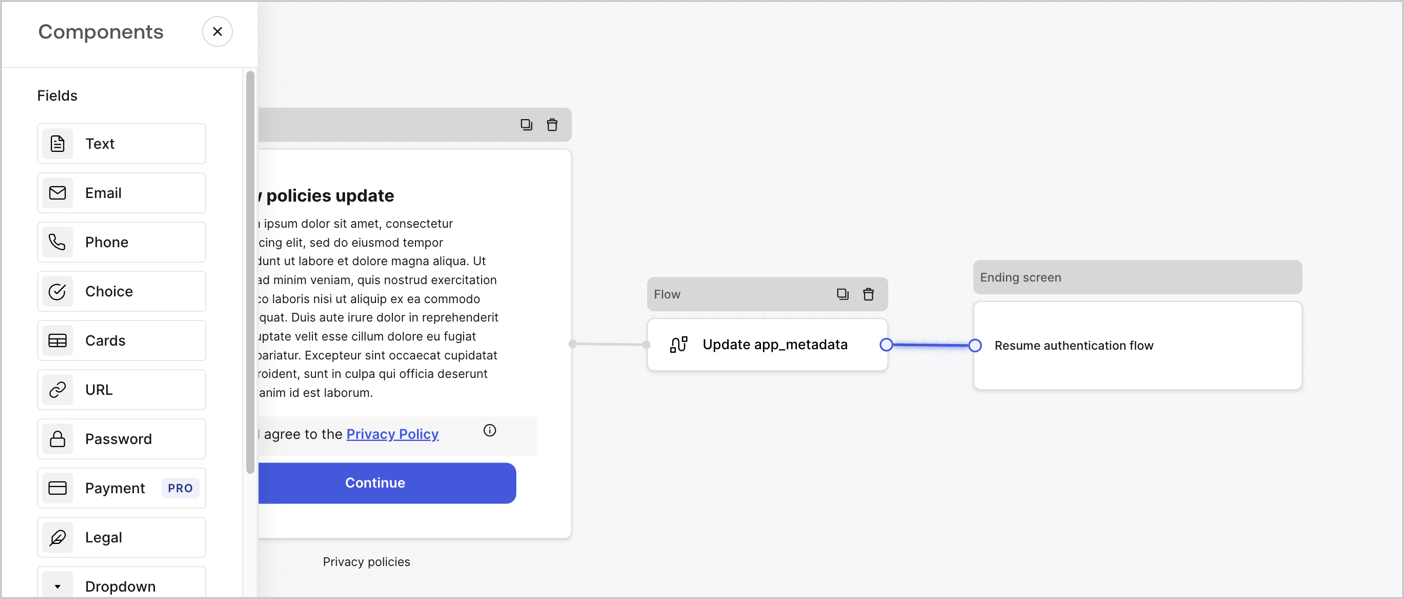
Add a **Flow** node after the **Step** node to update the `app_metadata` and resume the authentication flow by following these steps:

1. Select **Flow** from the bottom of the Form editor.
2. Remove the existing link between the **Step** and **Ending Screen** nodes.
3. Select the new **Flow** > **Click to add a flow** > **Create a new flow.**

   * Enter `Update app_metadata` in the **Name** field.
   * Select **Create**.
   * Select **Save**.
4. Link the **Flow** node to the **Step** and **Ending Screen** nodes as pictured below.
5. Select **Publish** to save.
<Frame>
  <img src="https://mintcdn.com/docs-dev-feat-update-styling-docs-for-universal-components/aryv-85zS-Myv9K1/docs/images/cdy7uua7fh8z/6YIkzm7SrpM9LW76AXuRzh/353c518fe82bbaa440836da1d83596d6/link-policies.png?fit=max&auto=format&n=aryv-85zS-Myv9K1&q=85&s=b172e3afa7993205d884cbb01e8fa5b9" alt="Dashboard > Actions > Forms > Form" data-og-width="1404" width="1404" data-og-height="599" height="599" data-path="docs/images/cdy7uua7fh8z/6YIkzm7SrpM9LW76AXuRzh/353c518fe82bbaa440836da1d83596d6/link-policies.png" data-optimize="true" data-opv="3" srcset="https://mintcdn.com/docs-dev-feat-update-styling-docs-for-universal-components/aryv-85zS-Myv9K1/docs/images/cdy7uua7fh8z/6YIkzm7SrpM9LW76AXuRzh/353c518fe82bbaa440836da1d83596d6/link-policies.png?w=280&fit=max&auto=format&n=aryv-85zS-Myv9K1&q=85&s=7af0432e5506194dec496b00fe818c1a 280w, https://mintcdn.com/docs-dev-feat-update-styling-docs-for-universal-components/aryv-85zS-Myv9K1/docs/images/cdy7uua7fh8z/6YIkzm7SrpM9LW76AXuRzh/353c518fe82bbaa440836da1d83596d6/link-policies.png?w=560&fit=max&auto=format&n=aryv-85zS-Myv9K1&q=85&s=b3bf4f8756673a61665e44c91e530c32 560w, https://mintcdn.com/docs-dev-feat-update-styling-docs-for-universal-components/aryv-85zS-Myv9K1/docs/images/cdy7uua7fh8z/6YIkzm7SrpM9LW76AXuRzh/353c518fe82bbaa440836da1d83596d6/link-policies.png?w=840&fit=max&auto=format&n=aryv-85zS-Myv9K1&q=85&s=880195177f5ccc304e76167e14e858bb 840w, https://mintcdn.com/docs-dev-feat-update-styling-docs-for-universal-components/aryv-85zS-Myv9K1/docs/images/cdy7uua7fh8z/6YIkzm7SrpM9LW76AXuRzh/353c518fe82bbaa440836da1d83596d6/link-policies.png?w=1100&fit=max&auto=format&n=aryv-85zS-Myv9K1&q=85&s=ec64eb924d8335923118395305ebda67 1100w, https://mintcdn.com/docs-dev-feat-update-styling-docs-for-universal-components/aryv-85zS-Myv9K1/docs/images/cdy7uua7fh8z/6YIkzm7SrpM9LW76AXuRzh/353c518fe82bbaa440836da1d83596d6/link-policies.png?w=1650&fit=max&auto=format&n=aryv-85zS-Myv9K1&q=85&s=49633bf5b63a3ae2cd0e25a6c1868ea8 1650w, https://mintcdn.com/docs-dev-feat-update-styling-docs-for-universal-components/aryv-85zS-Myv9K1/docs/images/cdy7uua7fh8z/6YIkzm7SrpM9LW76AXuRzh/353c518fe82bbaa440836da1d83596d6/link-policies.png?w=2500&fit=max&auto=format&n=aryv-85zS-Myv9K1&q=85&s=c9cb131619dcea14b9268df5904927c3 2500w" />
</Frame>

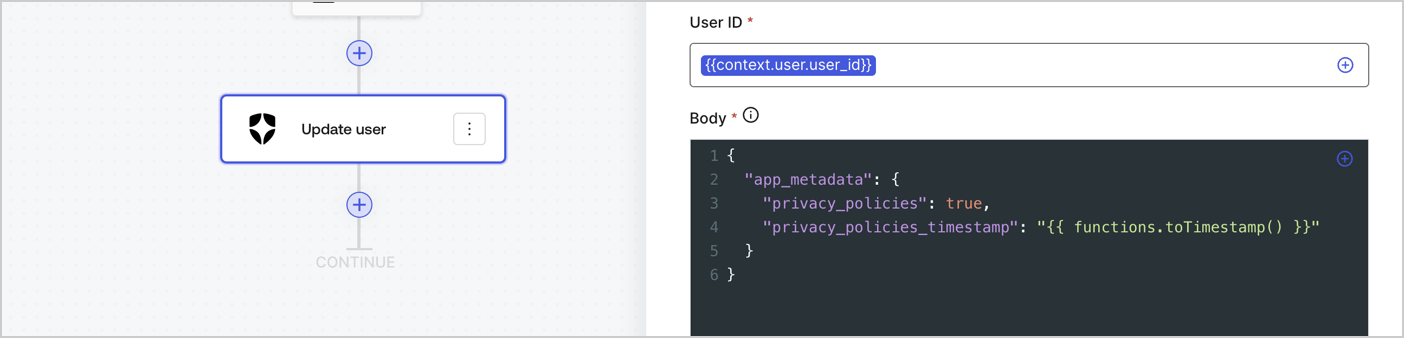
Add an Auth0 Update user action to the flow by following these steps:

1. Select the **Flow** **Update app\_metadata** > **Edit flow** to open the Flow editor in a new tab.
2. Below the StartAction, select the **+** icon to add an **Update user** action. Complete the fields below, then select **Save** to continue.

   * **Connection**: Select from the dropdown the Vault connection to your M2M application.

   * **User ID**: Enter `{{context.user.user_id}}`.

   * **Body**: Copy and paste the following code to update the app\_metadata with the privacy\_policies and privacy\_policies\_timestamp properties.

     ```text lines theme={null}
     {
       "app_metadata": {
         "privacy_policies": true,
         "privacy_policies_timestamp": "{{ functions.toTimestamp() }}"
       }
     }
     ```

   * Select **Save**.
3. Select **Publish** to save.
<Frame>
  <img src="https://mintcdn.com/docs-dev-feat-update-styling-docs-for-universal-components/MozyEJ38bCSf_xyr/docs/images/cdy7uua7fh8z/CvMNIwWrOUwaFW4X3G28p/1fb70ae57a20749d9ffaaba8dc0b7e26/update-user-privacy.png?fit=max&auto=format&n=MozyEJ38bCSf_xyr&q=85&s=cb76ce8cf7380d16ac6bb3a6263500b0" alt="Dashboard > Actions > Forms > User case privacy policy code" data-og-width="1404" width="1404" data-og-height="338" height="338" data-path="docs/images/cdy7uua7fh8z/CvMNIwWrOUwaFW4X3G28p/1fb70ae57a20749d9ffaaba8dc0b7e26/update-user-privacy.png" data-optimize="true" data-opv="3" srcset="https://mintcdn.com/docs-dev-feat-update-styling-docs-for-universal-components/MozyEJ38bCSf_xyr/docs/images/cdy7uua7fh8z/CvMNIwWrOUwaFW4X3G28p/1fb70ae57a20749d9ffaaba8dc0b7e26/update-user-privacy.png?w=280&fit=max&auto=format&n=MozyEJ38bCSf_xyr&q=85&s=a7fde90cb89beae8210d3df053897c6a 280w, https://mintcdn.com/docs-dev-feat-update-styling-docs-for-universal-components/MozyEJ38bCSf_xyr/docs/images/cdy7uua7fh8z/CvMNIwWrOUwaFW4X3G28p/1fb70ae57a20749d9ffaaba8dc0b7e26/update-user-privacy.png?w=560&fit=max&auto=format&n=MozyEJ38bCSf_xyr&q=85&s=8bd999a8322d46d3f42ecdbfd7f652a1 560w, https://mintcdn.com/docs-dev-feat-update-styling-docs-for-universal-components/MozyEJ38bCSf_xyr/docs/images/cdy7uua7fh8z/CvMNIwWrOUwaFW4X3G28p/1fb70ae57a20749d9ffaaba8dc0b7e26/update-user-privacy.png?w=840&fit=max&auto=format&n=MozyEJ38bCSf_xyr&q=85&s=33a4aec6dca4918d195870693a0510c9 840w, https://mintcdn.com/docs-dev-feat-update-styling-docs-for-universal-components/MozyEJ38bCSf_xyr/docs/images/cdy7uua7fh8z/CvMNIwWrOUwaFW4X3G28p/1fb70ae57a20749d9ffaaba8dc0b7e26/update-user-privacy.png?w=1100&fit=max&auto=format&n=MozyEJ38bCSf_xyr&q=85&s=0233025520e759b6acbfd53b8d549954 1100w, https://mintcdn.com/docs-dev-feat-update-styling-docs-for-universal-components/MozyEJ38bCSf_xyr/docs/images/cdy7uua7fh8z/CvMNIwWrOUwaFW4X3G28p/1fb70ae57a20749d9ffaaba8dc0b7e26/update-user-privacy.png?w=1650&fit=max&auto=format&n=MozyEJ38bCSf_xyr&q=85&s=23e9b48a79e572b7ff7f3ede2b15fd3b 1650w, https://mintcdn.com/docs-dev-feat-update-styling-docs-for-universal-components/MozyEJ38bCSf_xyr/docs/images/cdy7uua7fh8z/CvMNIwWrOUwaFW4X3G28p/1fb70ae57a20749d9ffaaba8dc0b7e26/update-user-privacy.png?w=2500&fit=max&auto=format&n=MozyEJ38bCSf_xyr&q=85&s=a0aa197d1e8c3877ee85e6784e0d5ebb 2500w" />
</Frame>

<Callout icon="file-lines" color="#0EA5E9" iconType="regular">
  The flow **Update app\_metadata** adds a `privacy_policies true` value to the app`_metadata` object and also generates a timestamp with a [helper function.](/docs/customize/forms/variables)
</Callout>

## Retrieve the form render code

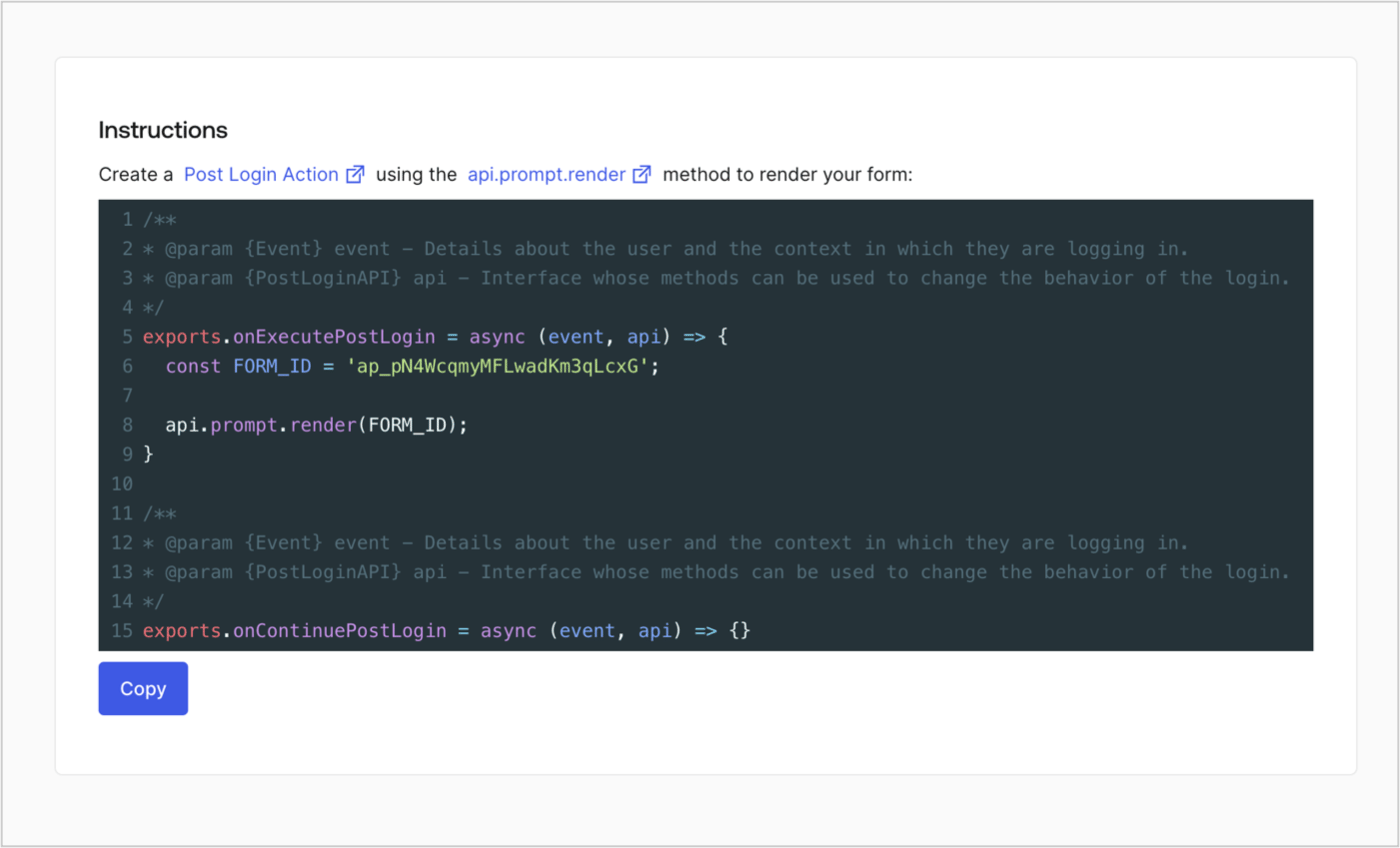
Retrieve your form render code to visually render the form with a custom Post Login Action by following these steps:

* From the Form editor, select **`<> Render`**.
* Select **Copy**.
<Frame>
  <img src="https://mintcdn.com/docs-dev-feat-update-styling-docs-for-universal-components/zs0clQlg6aGSeKnF/docs/images/cdy7uua7fh8z/2EIUzc539sq9lwoTKbjoJv/496a864c0fc44a782c9cadca119dbfb0/embed.png?fit=max&auto=format&n=zs0clQlg6aGSeKnF&q=85&s=4fdda266e141f2deff0daf6bb5d9fafb" alt="Dashboard > Actions > Forms > Form > Embed" data-og-width="1400" width="1400" data-og-height="848" height="848" data-path="docs/images/cdy7uua7fh8z/2EIUzc539sq9lwoTKbjoJv/496a864c0fc44a782c9cadca119dbfb0/embed.png" data-optimize="true" data-opv="3" srcset="https://mintcdn.com/docs-dev-feat-update-styling-docs-for-universal-components/zs0clQlg6aGSeKnF/docs/images/cdy7uua7fh8z/2EIUzc539sq9lwoTKbjoJv/496a864c0fc44a782c9cadca119dbfb0/embed.png?w=280&fit=max&auto=format&n=zs0clQlg6aGSeKnF&q=85&s=e9f6f7580c8ed12427be30dce2824c3f 280w, https://mintcdn.com/docs-dev-feat-update-styling-docs-for-universal-components/zs0clQlg6aGSeKnF/docs/images/cdy7uua7fh8z/2EIUzc539sq9lwoTKbjoJv/496a864c0fc44a782c9cadca119dbfb0/embed.png?w=560&fit=max&auto=format&n=zs0clQlg6aGSeKnF&q=85&s=4507a1dc618757c59c805a961d5d6d06 560w, https://mintcdn.com/docs-dev-feat-update-styling-docs-for-universal-components/zs0clQlg6aGSeKnF/docs/images/cdy7uua7fh8z/2EIUzc539sq9lwoTKbjoJv/496a864c0fc44a782c9cadca119dbfb0/embed.png?w=840&fit=max&auto=format&n=zs0clQlg6aGSeKnF&q=85&s=8005c24f5d7d585d0624f38e3adc61cb 840w, https://mintcdn.com/docs-dev-feat-update-styling-docs-for-universal-components/zs0clQlg6aGSeKnF/docs/images/cdy7uua7fh8z/2EIUzc539sq9lwoTKbjoJv/496a864c0fc44a782c9cadca119dbfb0/embed.png?w=1100&fit=max&auto=format&n=zs0clQlg6aGSeKnF&q=85&s=ec381771e4e19bb32e3f57d5512c2ac4 1100w, https://mintcdn.com/docs-dev-feat-update-styling-docs-for-universal-components/zs0clQlg6aGSeKnF/docs/images/cdy7uua7fh8z/2EIUzc539sq9lwoTKbjoJv/496a864c0fc44a782c9cadca119dbfb0/embed.png?w=1650&fit=max&auto=format&n=zs0clQlg6aGSeKnF&q=85&s=a2b431ee7487a055886f70d8c208552a 1650w, https://mintcdn.com/docs-dev-feat-update-styling-docs-for-universal-components/zs0clQlg6aGSeKnF/docs/images/cdy7uua7fh8z/2EIUzc539sq9lwoTKbjoJv/496a864c0fc44a782c9cadca119dbfb0/embed.png?w=2500&fit=max&auto=format&n=zs0clQlg6aGSeKnF&q=85&s=dfdc2abc1b801169a62850a46be558a3 2500w" />
</Frame>

## Create a Post Login Action

Create a post-login Action to render your form by following these steps:

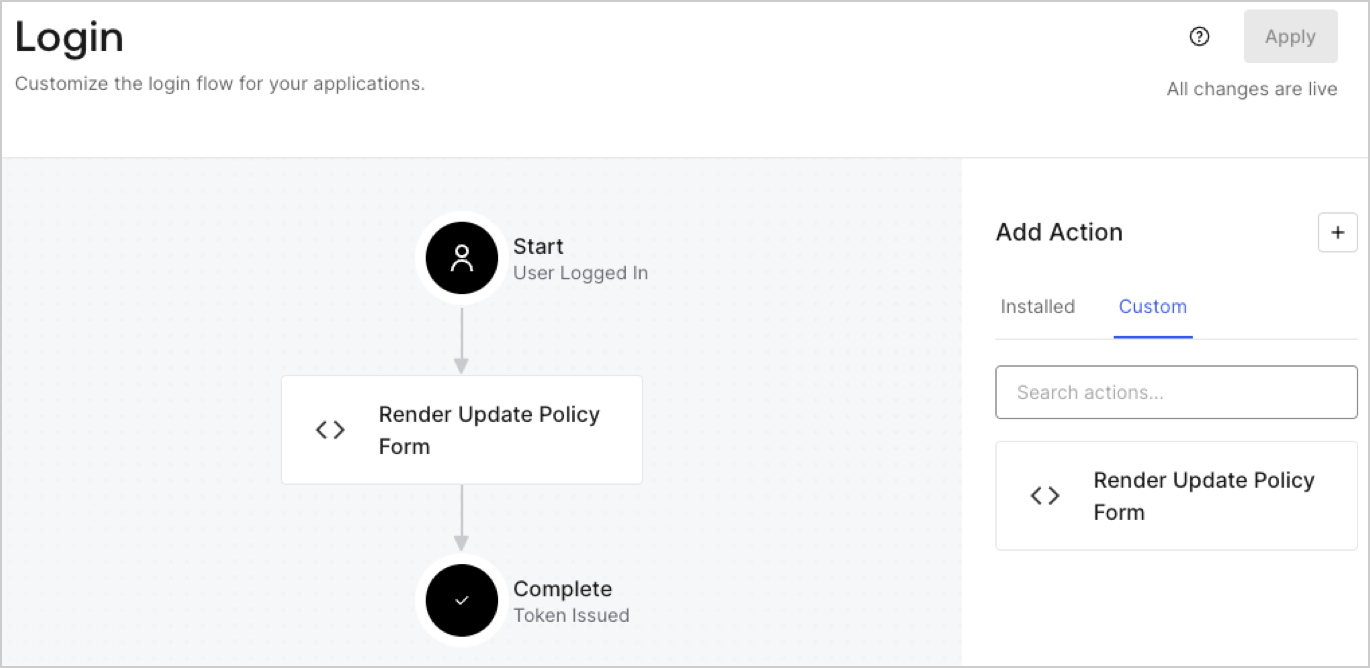
1. Navigate to **Auth0 Dashboard > Actions > Flows > Login.**
2. Select the **+** icon and Select **Build from scratch**:

   * **Name**: Enter `Render Update Policy Form`.
   * **Trigger**: Select `Login / Post Login`.
   * **Runtime**: Select the recommended version.
3. Select **Create**.

To configure the post-login Action:

1. Delete the existing code from the Code editor.
2. Paste the form render code into the Code editor.
3. Edit the code to define the conditional logic that will render the form.

   ```javascript lines theme={null}
   /**
   * @param {Event} event - Details about the user and the context in which they are logging in.
   * @param {PostLoginAPI} api - Interface whose methods can be used to change the behavior of the login.
   */
   exports.onExecutePostLogin = async (event, api) => {
     const FORM_ID = 'REPLACE_WITH_YOUR_FORM_ID';

     if (event.user.app_metadata.privacy_policies !== true) {
       api.prompt.render(FORM_ID);
     }
   }

   exports.onContinuePostLogin = async (event, api) => { }
   ```

   <Callout icon="file-lines" color="#0EA5E9" iconType="regular">
     The example code above will render the form when a user is missing the app metadata `privacy_policies` property.
   </Callout>
4. Select **Deploy.**
5. Drag and Drop the **Render Update Policy Form** Action to the **Login** flow.
   <Frame>
     <img src="https://mintcdn.com/docs-dev-feat-update-styling-docs-for-universal-components/48yZN0m6i0xDoCD1/docs/images/cdy7uua7fh8z/5TOwDgevZsBqd7yZynUYWU/41ca909dc3007aed4f40ff794a05efa5/postlogin.png?fit=max&auto=format&n=48yZN0m6i0xDoCD1&q=85&s=2e48f2a0bdaa19f4bd210714bc8026a4" alt="Dashboard > Forms > Use Case > Render update policy form login action" data-og-width="1370" width="1370" data-og-height="668" height="668" data-path="docs/images/cdy7uua7fh8z/5TOwDgevZsBqd7yZynUYWU/41ca909dc3007aed4f40ff794a05efa5/postlogin.png" data-optimize="true" data-opv="3" srcset="https://mintcdn.com/docs-dev-feat-update-styling-docs-for-universal-components/48yZN0m6i0xDoCD1/docs/images/cdy7uua7fh8z/5TOwDgevZsBqd7yZynUYWU/41ca909dc3007aed4f40ff794a05efa5/postlogin.png?w=280&fit=max&auto=format&n=48yZN0m6i0xDoCD1&q=85&s=008c0f3e83201c56be70f6c4b4944d94 280w, https://mintcdn.com/docs-dev-feat-update-styling-docs-for-universal-components/48yZN0m6i0xDoCD1/docs/images/cdy7uua7fh8z/5TOwDgevZsBqd7yZynUYWU/41ca909dc3007aed4f40ff794a05efa5/postlogin.png?w=560&fit=max&auto=format&n=48yZN0m6i0xDoCD1&q=85&s=7e9f2d310d03b477f0b1c9552381a9be 560w, https://mintcdn.com/docs-dev-feat-update-styling-docs-for-universal-components/48yZN0m6i0xDoCD1/docs/images/cdy7uua7fh8z/5TOwDgevZsBqd7yZynUYWU/41ca909dc3007aed4f40ff794a05efa5/postlogin.png?w=840&fit=max&auto=format&n=48yZN0m6i0xDoCD1&q=85&s=3e234188a735a25f34c873d7555b9f81 840w, https://mintcdn.com/docs-dev-feat-update-styling-docs-for-universal-components/48yZN0m6i0xDoCD1/docs/images/cdy7uua7fh8z/5TOwDgevZsBqd7yZynUYWU/41ca909dc3007aed4f40ff794a05efa5/postlogin.png?w=1100&fit=max&auto=format&n=48yZN0m6i0xDoCD1&q=85&s=de45a8a06f8a32dcc11f712521967415 1100w, https://mintcdn.com/docs-dev-feat-update-styling-docs-for-universal-components/48yZN0m6i0xDoCD1/docs/images/cdy7uua7fh8z/5TOwDgevZsBqd7yZynUYWU/41ca909dc3007aed4f40ff794a05efa5/postlogin.png?w=1650&fit=max&auto=format&n=48yZN0m6i0xDoCD1&q=85&s=bd9f6f1d979bbb4c00f1765ad7535057 1650w, https://mintcdn.com/docs-dev-feat-update-styling-docs-for-universal-components/48yZN0m6i0xDoCD1/docs/images/cdy7uua7fh8z/5TOwDgevZsBqd7yZynUYWU/41ca909dc3007aed4f40ff794a05efa5/postlogin.png?w=2500&fit=max&auto=format&n=48yZN0m6i0xDoCD1&q=85&s=2e9250e8e5d55d635cb3aa8b7f022f32 2500w" />
   </Frame>
6. Select **Apply.**

### Test implementation

Test the implementation by following these steps:

1. Log in with an existing user whose app`_metadata` attribute `privacy_policies` does not have a value.
2. The post-login Action in the Login flow will render the form and prompt for acceptance.
3. Select **Auth0 Dashboard > User Management > Users,** locate the user and verify that the `app_metadata` attribute `privacy_policies` contains a `true` value and a timestamp.
